
At work I am a part of an email group where I receive automated updates from users interacting with our app. The problem is that 95% of the emails aren't relevant for me, but I can't just leave the group, because the other 5% of emails is really important (when errors happened etc.)
I found a good way to solve this for Gmail, so this document is a short tutorial on how to add a Gmail filter to automatically read such emails.
The nice thing about this is that the filtering is done on the server so for example if you also receive emails on your phone, they will be automatically read.
Create the filter (using Gmail)
Let's assume the emails that we want to filter are usually titled [My group] Some information and are sent from info@service.com.
- Paste the following into the search bar:
from:info@service.com ( subject:"[My group] Not relevant" OR subject:"[My group] Some other non relevant title" )- To add other filters simply add new
subject:lines - NOTE: the filters can be much more complex than this
- To add other filters simply add new
- On the right side of the search bar click on the "filters" icon
- This will open a menu, where you can modify the filter - click on
Create filter -
In the next step select
Mark as read- additionally you can create labels etc.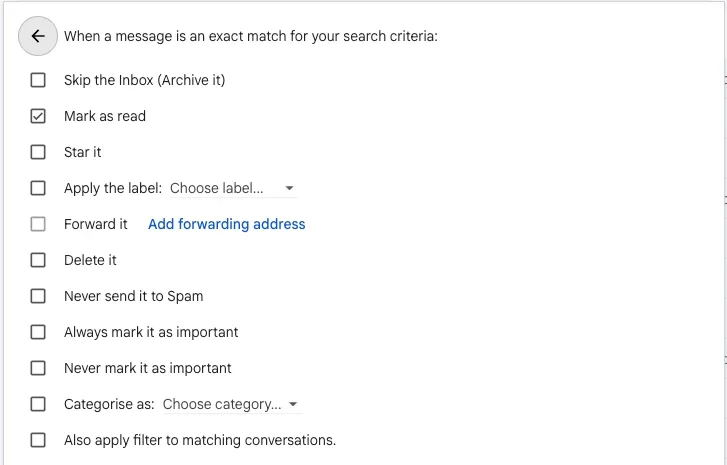
Managing filters
-
You can find your filters in the left sidebar under
Manage labels
-
From here, navigate to the Filters and blocked addresses tab and find your filter